
vfox (version fox) is a cross-platform, extensible version manager. It supports native Windows, and of course Unix-like! With it, you can quickly install and switch different environment.
Recently, I have wrote some plugins for vfox. The vfox-erlang plugin is one of them. I really like the plugin management mechanism of vfox (Based on Lua). You can use the vfox-erlang plugin to quickly manage mutiple Erlang/OTP version on your machine.
I have used a similar tool asdf before, but the previous experience of using asdf was not very good (I don’t mean to step on it~, the ASDF ecosystem is very strong), vfox now supports a lot of plugins, and can already manage the versions of most common mainstream languages.
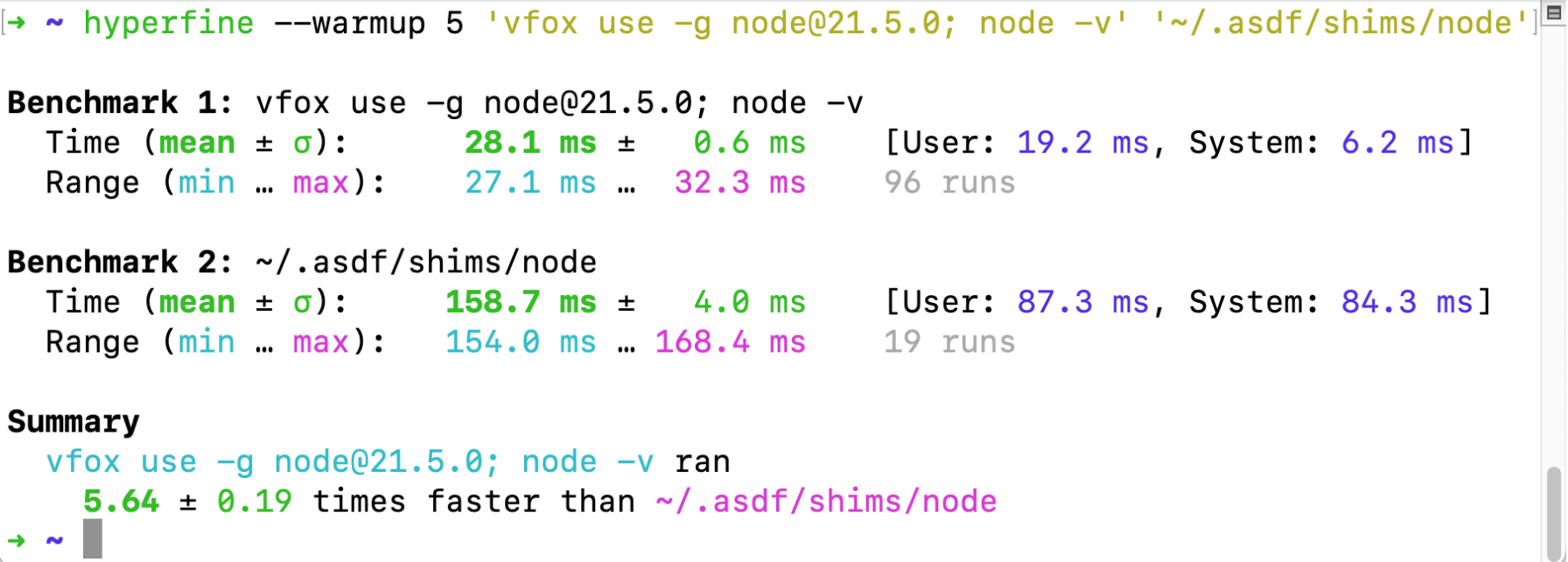
vfox’s version management workflow is generally similar to asdf, but with a bit better performance (about 5x), since asdf is written in shell at its core. The official documentation also gives a benchmark, see 《Comparison with asdf-vm》:
vfox, like asdf, can be configured globally and project level tool version via the .tool-version configuration file, which means that if you switch from asdf to vfox, it’s quite convenient.
Using vfox-erlang
This article mainly describes how to use the vfox-erlang plugin to manage multiple Erlang/OTP versions on the same machine. It is also common to have multiple versions of Erlang/OTP for testing and comparison in the same development environment.
At present, the actual installation process of the vfox-erlang plug-in implementation is to compile and install Erlang/OTP from the GitHub source code, so for the time being, it only supports the installation and management of Erlang/OTP versions on Unix-like systems (such as ubuntu, macos darwin, etc.) (the windows exe installer is actually provided by the official site, but recently I haven’t had enough time to perfect the plug-in implementation, and the scenarios of using Erlang in windows are generally relatively few).
Erlang is a programming language used to build massively scalable soft real-time systems with requirements on high availability. Some of its uses are in telecoms, banking, e-commerce, computer telephony and instant messaging. Erlang’s runtime system has built-in support for concurrency, distribution and fault tolerance. OTP is set of Erlang libraries and design principles providing middle-ware to develop these systems. It includes its own distributed database, applications to interface towards other languages, debugging and release handling tools. from site: https://www.erlang.org/
Install the vfox and vfox-erlang plugin
Before using vfox-erlang to manage Erlang/OTP versions, please make sure that you have installed vfox on your machine, you can refer to the official Quick Start documentation, this article takes Ubuntu 20.04 as an example.
1 | install vfox via apt |
Install the specified version of Erlang/OTP via plugin
Since Erlang/OTP is compiled and installed from source, we need to have the corresponding build toolchain and dependent software, here is an example of Ubuntu 20.04:
1 | install require utils |
and then we can then manage the installation of multiple Erlang/OTP versions via vfox.
1 | search a avaliable Erlang/OTP version to install |
1 | or you can also specific version |
When you see something like Install erlang@xxx success! information. It mean the the installation is complete. Next, you can use the vfox use command to switch Erlang/OTP version, so that the current shell session can use the corresponding Erlang/OTP version.
1 | use the specific Erlang/OTP version |

vfox provides three perspectives of version management: current shell session level, project level, global level, through a .tool-versions can flexibly assign different Erlang/OTP versions to different project directories, More information can be found in the official documentation: vfox-Switch runtime..
The usage examples in this article are mainly based on Linux systems, but the user documentation of vfox-erlang also gives the user guide install-in-darwin-macos-13 under MacOS Darwin, and provides continuous integration testing under Linux and MacOS for reference: vfox-erlang E2E testing. vfox-erlang E2E testing.

Happy and funny~