Read both languages or keep the original
Read Chinese and English captions together. For Japanese content, choose Chinese + original. Turn translation off to see only the transcript.
 TingSub听桥
LOCAL BILINGUAL CAPTIONS FOR BROWSER VIDEO
Add Chinese and English captions to English or Japanese videos in your browser. Your Apple Silicon Mac handles recognition and translation. Start captions for the current tab from the Chrome extension.
Apple Silicon · Chrome 116+ · Early release
See release notes for macOS requirements · Not Apple-notarized · Setup guide

A little further,
a little slower.
沿着海岸慢慢走,下一站不必着急。
Take your time along the coast. The next stop can wait.
OriginalTake your time along the coast. The next stop can wait.
Authored sample text. No audio playback, capture or recognition.
Bilingual view or original text
Local transcription and translation
Capture only the tab you choose
CAPTION EXPERIENCE
No built-in player captions needed. Start captions from the Chrome extension, adjust their size and position, or turn off translation to read just the transcript.
Read Chinese and English captions together. For Japanese content, choose Chinese + original. Turn translation off to see only the transcript.
Captions follow the video area. Drag to reposition them, adjust the text size, or use YouTube fullscreen. Expand long lines when needed; diagnostics stay tucked away.
Whisper transcribes; Qwen translates. Once models are downloaded, inference runs locally. No cloud API account or microphone permission is needed.
DESKTOP WORKSPACE
Preview captions, download models, start the service and copy your pairing code in the desktop app. Check download progress, find model files and open logs from the same window.
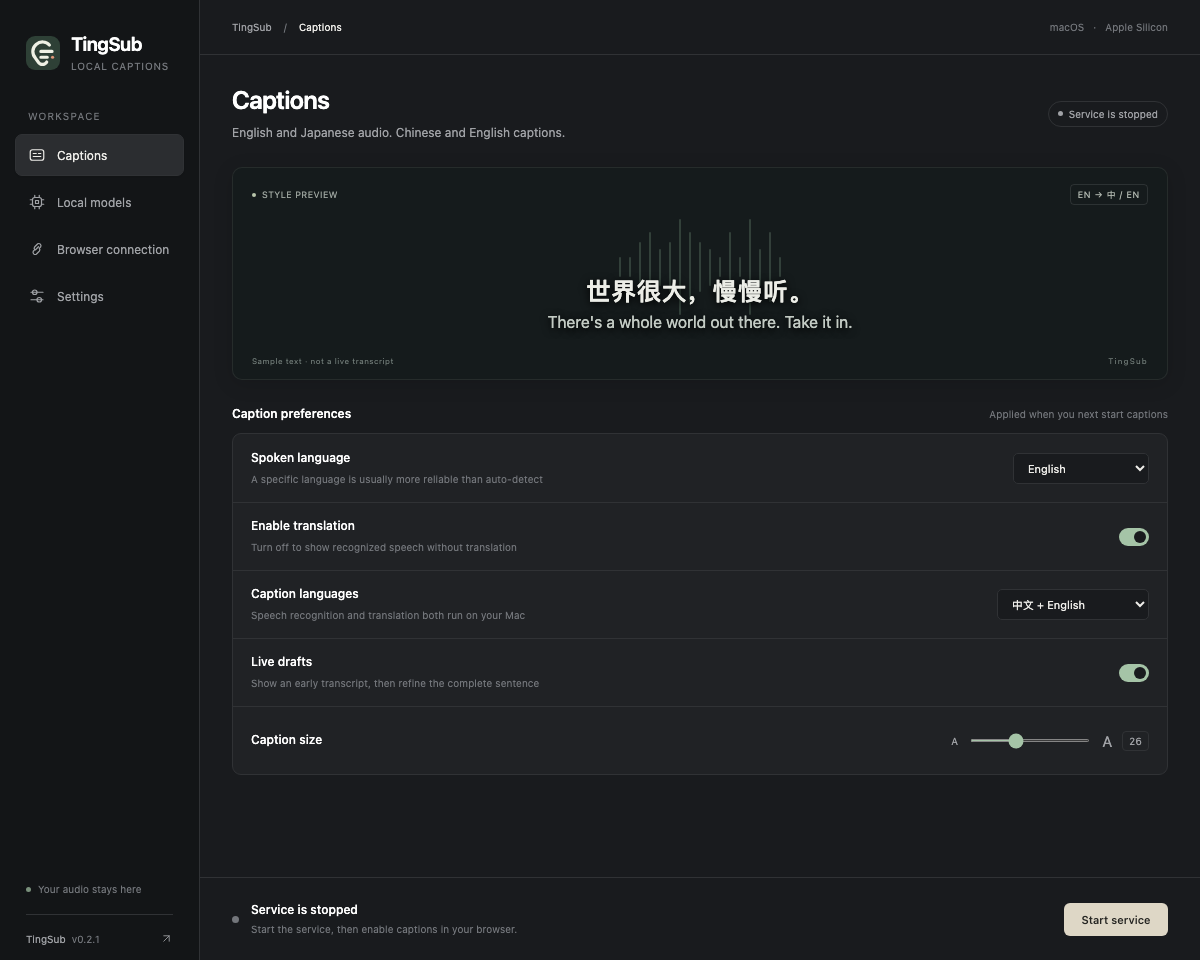
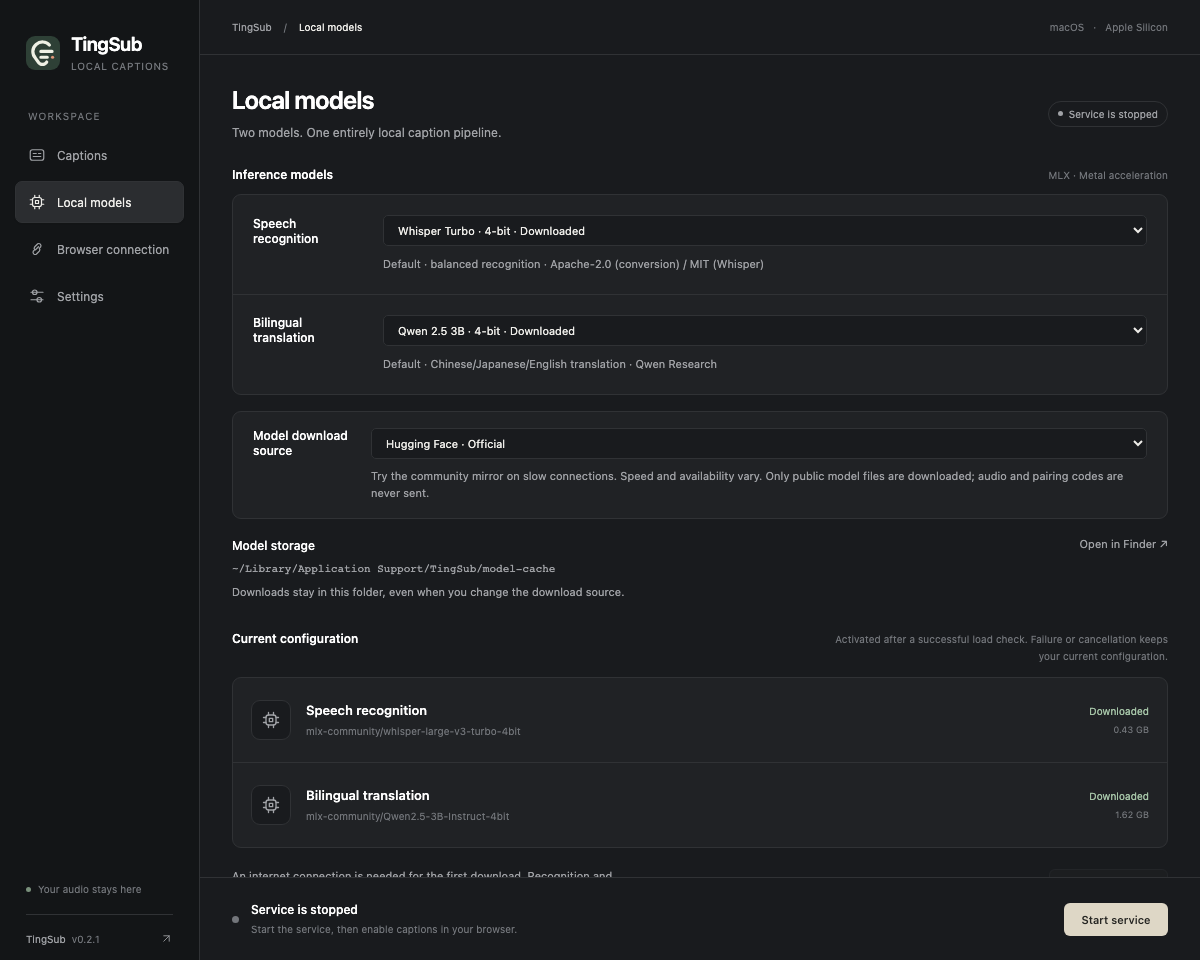
Actual desktop interface with sample captions and model states; not a live transcription or performance result.
Choose a Whisper model for recognition and a Qwen model for translation, then track download progress. On slower connections, try the community mirror or a custom HTTPS source.
Choose the spoken language, caption language and translation setting in either place. Changes apply when you start your next caption session.
GET STARTED
The app includes its runtime, so there is no separate Python or uv setup. Install the app, download models, then pair the Chrome extension. No GitHub account is needed to download the app or extension.
Download the DMG, drag TingSub to Applications, and launch it. Current releases are not Apple-notarized; follow the setup guide for first-launch gatekeeper prompts.
Choose a download source in Local models, download and validate your models, then start the service. Copy your pairing code from Browser connection.
Load the unpacked extension in Chrome Developer mode and paste your pairing code. Play a video, then start captions for that tab from the extension.
See release notes for macOS requirements · Not Apple-notarized
Setup guide ↗ Release notes & all downloads ↗ Build from sourceA FEW MORE THINGS
Apple Silicon Macs and Chrome 116+ are supported. Check the release notes for the minimum macOS version of the app you download. Source runs require macOS 14+. Intel Macs, Windows, Linux and Firefox are not supported yet.
Recognition and translation run on your Mac. TingSub does not upload audio, collect telemetry or automatically record. Dependencies and the first model download need internet. Inference can run offline once models are ready; livestream websites still need their own connection.
No. Try it on ordinary video tabs Chrome can capture, including Bilibili livestreams. Existing player captions are not required. Some restricted pages and fullscreen entered inside cross-origin embedded players may not show the overlay.
Latency and quality vary with sentence length, language, model and GPU load. Overlapping speakers, background music and long Japanese sentences can cause errors or delays. Captions assist understanding; there is no fixed latency or accuracy guarantee.
Yes. The buttons download GitHub Release assets directly, without signing in. The app includes its runtime; download models through the app separately. Current builds are not Apple-notarized. Extract the Chrome extension and load it in Developer mode; it is not listed in the Web Store.
TingSub source code is MIT. Model weights have separate licenses: the default Qwen 2.5 3B uses the Qwen Research License. MIT does not cover those weights. Review the model license guide before using or distributing them.
TING⌒SUB
Start with a stream, a talk, a conversation.